App Development for a Popular Cultural Festival
(Norfolk, VA)
The Challenge
Taste of India, one of Virginia’s largest single‑day cultural festivals, needed a modern way to guide thousands of guests through a packed schedule of performances, vendor booths, and food stalls in downtown Norfolk. Printed programs went out of date quickly, floor‑plan emails were hard to reference on crowded walkways, and paper raffle slips required nightly manual tallies. Organizers wanted a single mobile tool that worked on both iOS and Android without adding staff workload.
The Solution
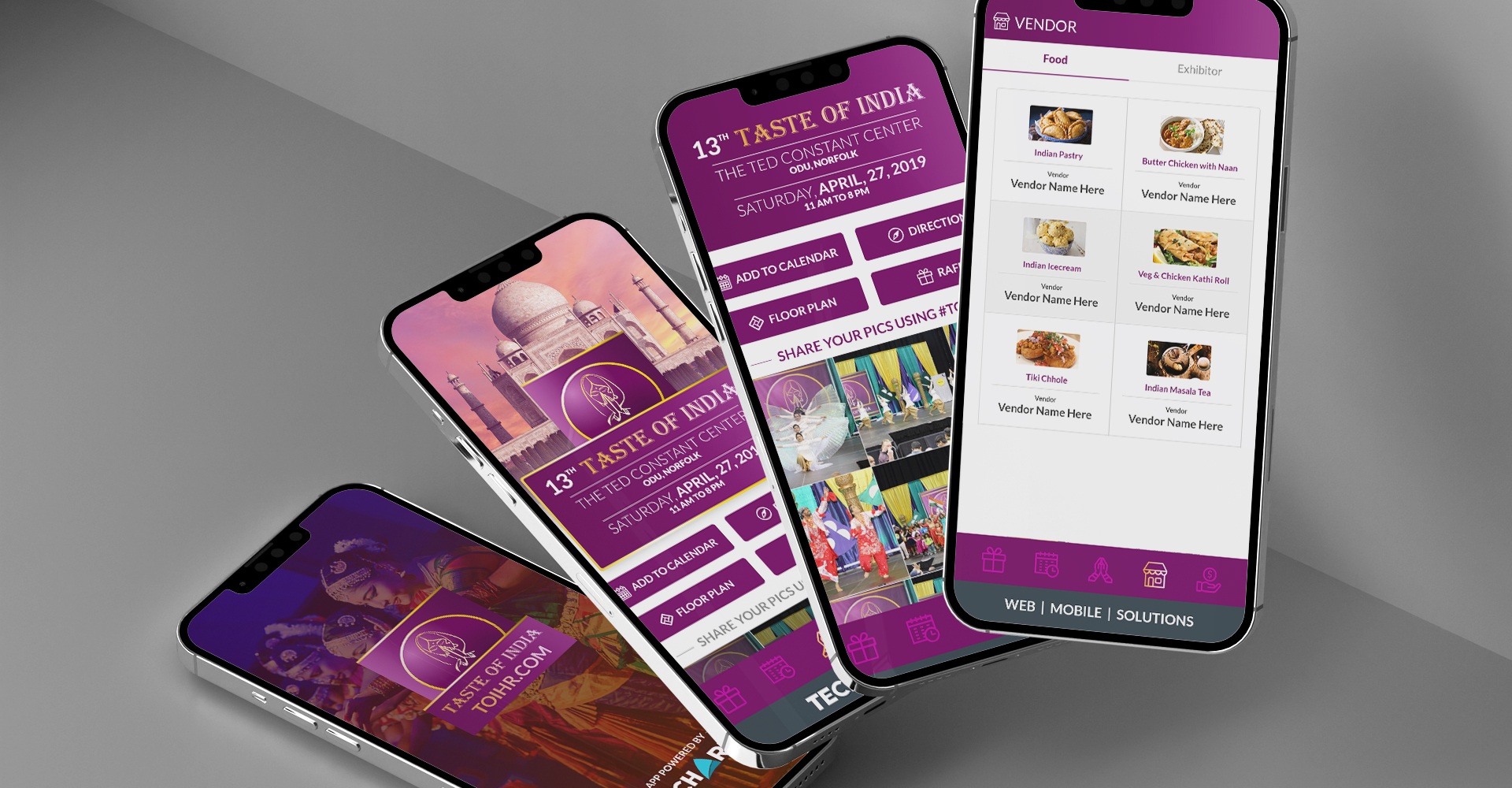
TechArk designed and launched a bilingual mobile app available in the Apple App Store and Google Play. The home screen offers four instant‑action buttons—Add to Calendar, Get Directions, View Floor Plan, and Enter Raffle—so attendees can orient themselves in seconds. A dynamic Schedule tab pulls live performance data, and dedicated Food and Vendor tabs list cuisine options and booth numbers with map pins. Push notifications alert users to lineup changes or raffle deadlines, while a digital entry form records each day’s raffle participants automatically for sponsors.
First 30 Days – Performance Snapshot
- App approved in both stores two weeks before festival day
- 3,200 downloads and 2,100 active users on event day
- 100 percent of raffle entries captured digitally, eliminating paper slips
- Zero support tickets; live schedule updates pushed in secondsOne app put every stage, stall, and raffle in the palm of each attendee’s hand
The Results
- Seamless attendee experience with real‑time schedules, vendor info, and wayfinding
- Significant cost savings by replacing printed programs and raffle paperwork
- Sponsors gained clean, exportable raffle data for post‑event follow‑ups
- TechArk framework allows rapid updates for future Taste of India festivals and other regional events
Highlights
The home page of the mobile app shows the event details clearly and also allows the user to quickly add an event to the calendar, get directions to the event, see the arena floor plans and participate in the raffle.
The Schedule page shows the events and allows the user to see all event details when any event is clicked.
Events can be added to the user’s calendar and they can also get the directions to the location using the mobile app.
Event Schedule and Vendor Information
The Event Schedule area shows an overview of all scheduled events and descriptions for each.
The Food and Vendor tabs allow the user to see the different Indian Cuisine that will be available at the event. Vendor Booth and details are also available within the Vendor tab.
Enter the Raffle
Users can digitally enter the event raffle by providing their Name and Email.
Users will be able to participate in the raffle everyday by clicking the button to submit an entry. The vote will be added once everyday.